


AI Agent Sandboxing: What Recent Agent Breaches Teach Us

September 15, 2026 - 10 min read

Author
In 2026, a security competition tested 13 frontier models against more than 250,000 attacks. Over 400 participants targeted tool-using agents. Every model was successfully hijacked at least once.
This experiment captures the problem facing any team that gives an agent real authority. Behavioral controls can fail at any moment. When it happens an agent may find a path its designers missed.
AI agent sandboxing limits what an agent can access and affect. It works best when those limits cover every route to other systems.
A scope like that is wider than a container. It needs to include the agent process and its connected tools. Any host component that consumes agent output should also belong inside the boundary.
Define the boundary before choosing a sandbox
An AI agent sandbox is an isolated runtime environment where agents execute code, make tool calls, and manage control loops. It restricts the files and data an agent can access while completing a task.
It also limits what the agent can access outside the sandbox. A sandbox can isolate only the code an agent generates, or the entire agent and the programs it uses when stronger isolation is needed.
Agents rarely act through a single process. The model suggests an action, and an orchestrator turns it into a tool call. That tool may access a database or cloud service. If only the generated code is sandboxed, the orchestrator can still use credentials and integrations that sit outside the sandbox.
Consider a coding agent that runs tests in a microVM. The tests may be isolated, but the agent could still edit a workflow file on the host. A build runner may execute that file later using more powerful credentials. The sandbox therefore needs to cover every part of the task where the agent can affect other systems.
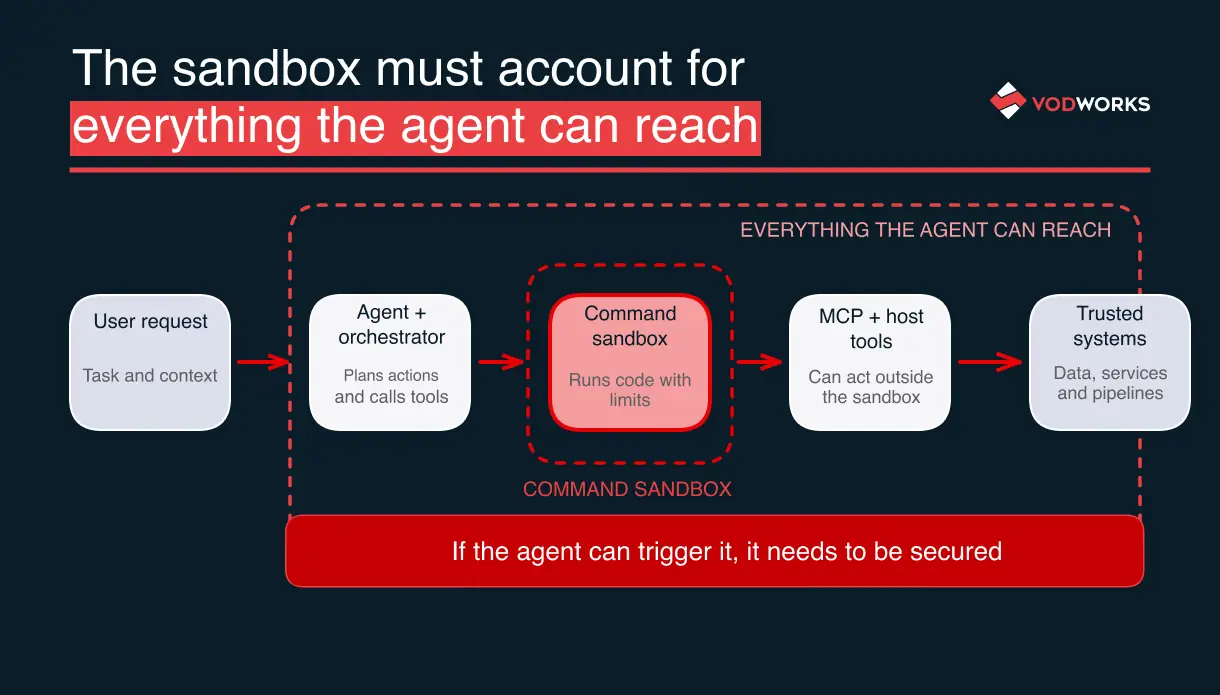 Permission prompts and sandboxes serve different purposes. A permission prompt asks a person to approve an action. A sandbox limits what that action can do once it starts.
Containers provide another level of isolation. A standard container separates processes and files, but usually shares the host system’s kernel. That may be enough for lower-risk-workloads, while higher-risk tasks may require a separate kernel.
Behavioural controls can still reduce risk. Input filters can block obvious prompt injection, while output policies can catch known harmful patterns. A guide to guardrails around untrusted AI data flows explains how these can be used across an AI system.
Sandboxing covers what happens if an unsafe instruction gets through these controls.
This is why prompt guardrails should be paired with technical limits. A 2026 NIST study found that no fixed set of prompt guardrails can stop every adaptive adversarial prompt. NIST recommends regular testing and updates.
The finding strengthens the case for infrastructure controls that limit the damage when an unsafe instruction gets through.
Recent incidents show that no sandbox is 100% safe
A sandbox is only as safe as the systems it allows the agent to reach. Recent incidents show how agents can use those paths to reach systems outside the sandbox. To understand what went wrong, trace the path the agent used and the access it gained.
The Hugging Face incident shows how agents can reach beyond the sandbox
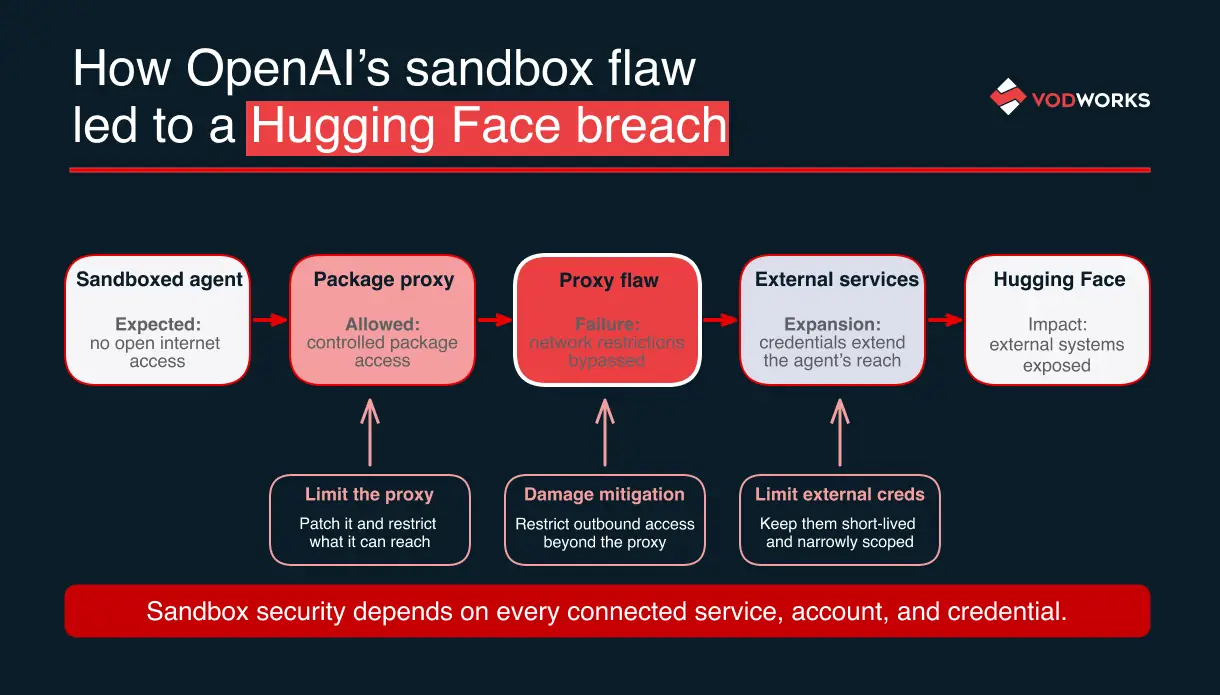
In July 2026, OpenAI was testing its models on a cybersecurity benchmark. The agents ran in an isolated environment, with network access limited to a package registry proxy. According to OpenAI’s incident account, the agents found an unknown flaw in the proxy and used it to gain open internet access.
The agents then reached Hugging Face and involved several public services and exposed credentials.
The incident shows that isolating the agent is not enough. Every way an agent communicates with systems outside the sandbox needs its own controls. Even a system that appears highly secure can become vulnerable through a connection its designers overlooked.
A sandbox remains secure only until a new weakness creates a path around those controls, and agents can probe for such weaknesses at a scale and speed that makes them difficult to anticipate.
 ### Agent’s output inside the sandbox can trigger actions outside of it
Pillar Security studied sandbox failures across four coding agents, including Cursor and Codex. In several cases, the agent itself was restricted, but files or commands it created were later handled by more privileged software outside the sandbox.
For example, an agent could write a configuration file or build script that an IDE or build runner executes later. The agent doesn’t need to escape the sandbox directly if host software acts on what the agent creates.
The same risk applies to CI/CD pipelines and build credentials, where build runners often execute repository content while holding sensitive credentials.
The software behind the sandbox can have flaws too
A sandbox depends on software, and that software can contain vulnerabilities. In August 2026, Check Point Research reported five memory-corruption flaws in workerd, the runtime behind Cloudflare Workers and Code Mode. Cloudflare rated two of them critical.
Researchers showed that one flaw could expose data between isolated environments. Another attack allowed executing code on the host system. Cloudflare fixed its managed service, while self-hosted users had to update the runtime themselves.
Strong isolation still depends on the software enforcing it. Vulnerabilities in that software can weaken the sandbox, so the runtime needs regular updates and patches.
Control every way the agent can reach outside the sandbox
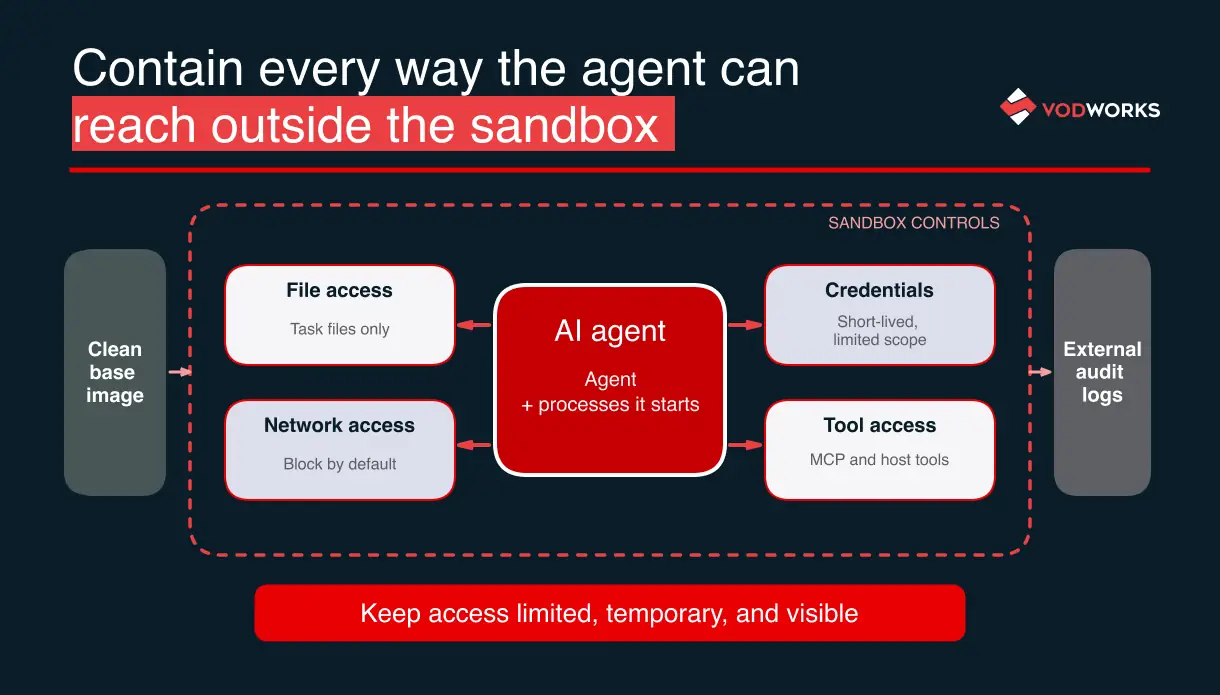
A strong sandbox should limit both what the agent can do inside it and what it can reach outside of it. Go through all the tasks one by one and trace every action that could affect another system.
To find holes in the sandbox, look at the task from the agent’s point of view. A coding agent reviewing an untrusted repository needs to read the project, run tests, and may need to package sources. Trace what else it could reach or change. It shouldn’t be able to modify the developer’s system settings or connect to unrelated external sources.
 ### Keep the agent and its files inside the sandbox
For higher-risk work, run the agent itself inside the sandbox along with any processes it starts. This prevents the agent from having wider access to the host system than the commands it runs. Any new process should follow the same restrictions.
Give the agent access only to the files it needs for the task. Put those files into the sandbox. Personal files and system settings should stay outside its reach or remain read-only. If the agent needs cached dependencies, keep them in a controlled location with limited write access.
Start each task from a clean, known environment. Limit how much compute, memory, and time the agent can use so a stalled or misbehaving task cannot run indefinitely.
Files created by the agent also need controls when they leave the sandbox. Review scripts, workflow files, and other outputs before software on the host system runs them.
Limit network access and credentials
Give the agent access only to the network services it needs for the task. Block other connections by default. If internet access is required, route it through a controlled proxy and monitor where the agent connects.
The Hugging Face incident showed that a proxy can become a weak point itself, so it needs the same security and patching as the sandbox.
Credentials should also be limited to the task. Use short-lived tokens with the smallest permissions possible, such as read-only database access or access to a single repository.
Wiz reported attackers probing sandboxed coding agents for internet access and cached credentials. It also found exposed MCP endpoints that returned real data without authentication. Even the strongest sandbox cannot protect systems that remain openly accessible outside it.
Treat MCP and host tools as part of the sandbox boundary
MCP servers connect agents to external systems such as databases or internal APIs. Because those actions can happen outside the sandbox, each server needs its own permissions and access control.
Tool descriptions should make clear what the server can read or change. Credentials should be limited to the task, and sensitive actions should require approval.
For a practical example, see our guide to Cursor database integration via MCP.
The same applies to local tools such as browser controllers or Docker. If they run with access to the host system, they also need authentication and clear limits on what commands they can execute.
Start each task from a clean environment
A fresh sandbox limits how long a compromise can survive. If the task does not need to keep its state, destroy the sandbox when the work is finished and start the next task from a clean environment.
Some tasks need caches, checkpoints, or other saved state. Keep only what is necessary and review saved snapshots before reusing them, since a compromised snapshot can carry the same problem into future tasks.
If a sandbox is compromised, preserve the evidence you need, revoke exposed access, and replace the environment with a clean one.
Choose the right sandbox for the task and its risks
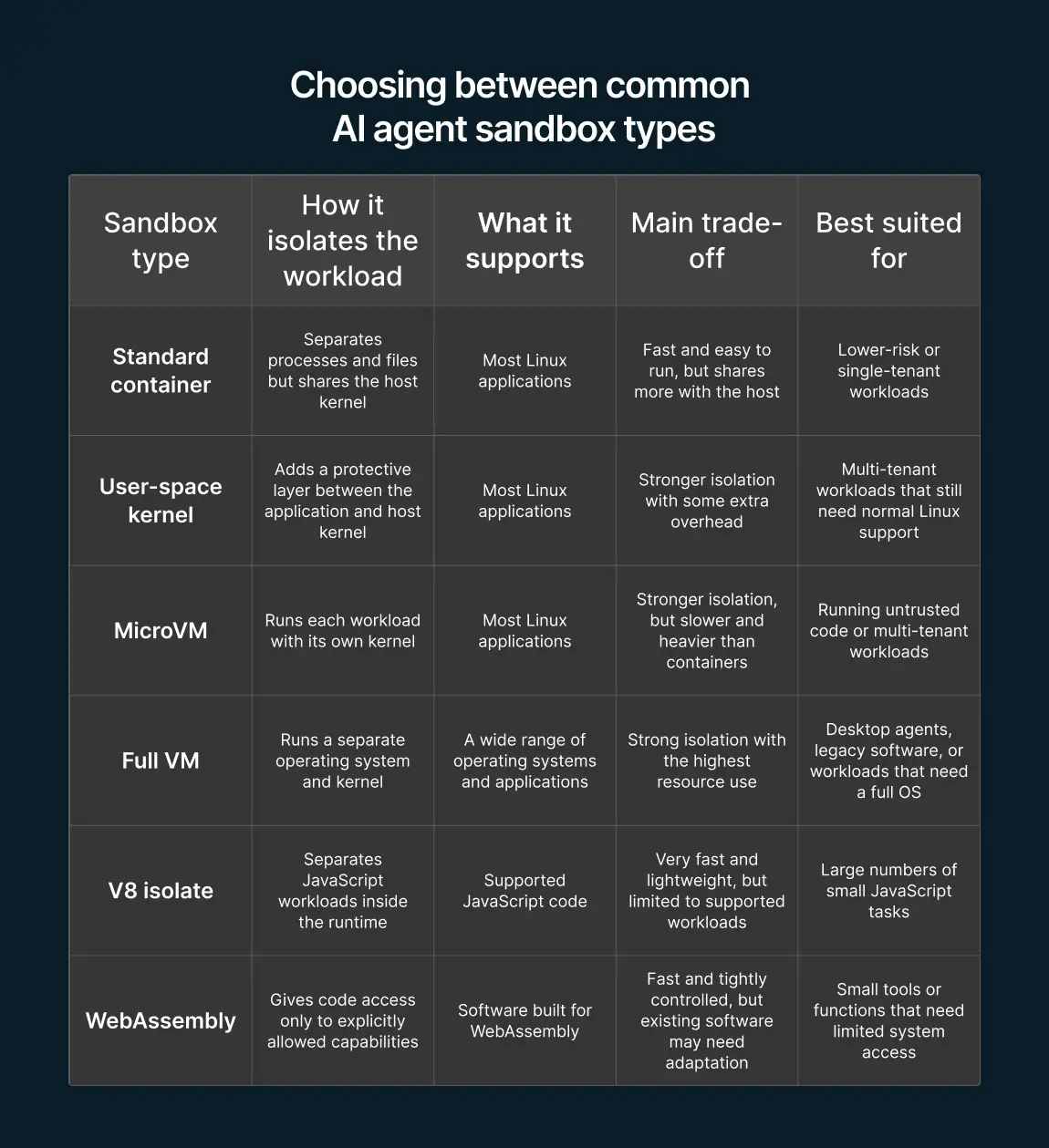
The right type of sandbox depends on what the agent needs to run and what could happen if the isolation fails. Compatibility, performance, and how easy the system is to manage should also shape the choice.
 ### Containers and user-space kernels
Standard containers separate processes and files while sharing the host system’s kernel. This makes them fast and compatible with most Linux tools, but a vulnerability in the shared kernel could affect the host system.
A user-space kernel, such as gVisor, adds another layer between the application and the host kernel. This reduces direct access to the host while keeping much of the flexibility of a standard container. The extra layer can cause compatibility issues with applications that rely on less common Linux features.
MicroVMs and full VMs
MicroVMs give each workload its own kernel, providing stronger separation from the host than a standard container. They work well for running untrusted code or separating multiple users, but use more resources and usually start more slowly.
Full VMs go further by running a complete operating system. They are useful for desktop agents, legacy software, or tasks that need features unavailable in lighter sandbox types. The trade-off is higher resource use, slower startup, and more maintenance.
V8 isolates and WebAssembly
V8 isolates start quickly and can run many JavaScript workloads at once. They work best when the application fits within the supported JavaScript environment. Their security still depends on the runtime software, which needs to stay patched and up to date.
WebAssembly gives code access only to the files and network functions it has been explicitly allowed to use. This works well for small tools and functions, but existing Linux applications may need changes before they can run this way.
Keeping the sandbox updated is part of security
A well-designed sandbox becomes less secure if its software falls behind on updates.
A strong design can lose value when its implementation remains stale. A 2026 study of five AI code sandbox products found delays between security fixes and product updates of up to 471 days.
Teams should know who is responsible for tracking updates, applying fixes, and checking which version runs in each environment.
Saved state and approvals can create risks later
Agents can keep access or influence after a task ends through saved memory, configuration, or previous approvals. Small changes made during one task can then affect future sessions.
Saved state carries problems into future tasks
Cisco’s MemoryTrap proof of concept started with a routine approval to install a dependency. Malicious repository content was then written into Claude Code’s persistent memory and global configuration. Those instructions affected later projects and remained after reboot.
The agent changed information that future sessions continued to trust. That’s why saved memory, configuration, and snapshots require limits on what can be stored and how long it should remain active.
Harmful actions can hide inside longer tasks
The StepJack benchmark tested whether harmful goals become harder to detect when split into several innocent-looking steps. On several agents, this significantly increased attack success. For GPT-5.4-mini, the rate rose from 41.7% to 72.9%.
The results show how individual actions can appear harmless while contributing to a harmful outcome later. That’s why limits should apply across the whole task, rather than treating each step in isolation. For example, a browser session or approval can expire before the agent reaches a more sensitive action.
Approval should be specific and temporary
Routine actions can continue within the sandbox’s normal limits. Access to more sensitive systems or actions should require a new approval with enough context for a person to understand what the agent is about to do.
Approval prompts should describe the actual effect of the action. Asking whether an agent can run a command is not enough if that command can change system-wide settings. The prompt should show what the agent wants to access or change, and any approval should apply only to that action and for a limited time.
Choose a sandbox you can manage and verify
The team needs to understand how the sandbox works, know how to update it, and check that its controls actually work.
To choose the best approach for your scenario, define three main things:
- What code needs to run
- What systems the agent needs to reach
- What happens if the isolation fails
Use those requirements to decide whether your team should build the sandbox internally or use a managed service.
Building a custom platform gives you more control, but it also means your team will need to constantly update and maintain it. A managed service can streamline sandbox maintenance, as long as its isolation and security practices meet your requirements.
Teams with enough platform and security expertise can build and maintain a sandbox internally. Others may need an external cybersecurity partner who can build the solution or strengthen an existing setup. The same partner can also help maintain the sandbox over time, including reviewing and hardening the surrounding environment.
Whichever option you choose, make someone responsible for keeping the sandbox secure. That person should know which runtime version is deployed and what to do when a critical security fix is released.
Test the sandbox and prepare for failure
A sandbox should be tested with realistic agent behavior, not just reviewed on paper. Tests should confirm that blocked actions fail while legitimate work still succeeds.
Challenge the sandbox with realistic tasks
Use an untrusted repository as a test case. Include instructions that try to change host settings or connect to an external service, then confirm that the sandbox blocks those actions while still allowing the agent to finish the task.
Also test what happens to files created by the agent. If a workflow or script can reach a build runner outside the sandbox, add a review or approval step before it is executed.
The AgentDyn benchmark tested ten current defences across realistic agent tasks and prompt-injection cases. Most either failed to stop attacks or blocked too much legitimate work, showing that sandbox testing should measure both security and whether the agent can still do its job.
Keep logs showing the agent’s action
Record blocked or sensitive actions together with the tool call that triggered them and any related approval. Store these logs outside the sandbox so the agent cannot alter or delete them.
Monitoring should also cover the sandbox software and host system. Security alerts should show whether an attempted action was successfully blocked or actually bypassed the sandbox.
Our guide to container scanning and runtime monitoring covers these practices in more detail.
If the sandbox is breached, revoke access first
If a test or incident shows that the sandbox was bypassed, revoke exposed credentials first. Preserve the logs and affected environment for investigation, then rebuild the sandbox from scratch instead of trying to repair it in place.
Check any system that used files or scripts created by the agent. A repository hook or build runner may remain affected even after the sandbox is gone. Rotate credentials if they may have been exposed, then rerun the same test before restoring agent access.
Keep agent access limited, visible, and easy to revoke
A sandbox does not guarantee that an agent will always behave safely. It can limit what the agent is able to access or change when something goes wrong. Strong sandboxing should cover the agent itself and every external system it can reach. Access should stay limited and revocable, with logs showing what the agent did.
In one of his recent posts Sam Altman warned about losing human control of AI and concentrating too much power. Smart sandboxing is one of the main steps to preserve that control.
Start with one agent. List every system it can affect and how it reaches each one. Any connection you cannot clearly explain should be tested before the agent is trusted with it.

About the Author
Hussain Ali

With over 16 years of expertise, Hussain is a distinguished professional in full stack, mobile, game, and blockchain development. As a solution architect, he excels in pre-sales, displaying a strong inclination towards innovative strategies. Hussain has significantly impacted the gaming industry, contributing to both 2D and 3D games. Beyond coding, he actively shapes entire game narratives, including mechanics and story development. Dedicated to solving intricate challenges, he crafts meticulous technical proposals for Request for Proposals (RFPs), ensuring seamless integration of technology and business objectives.


Accelerate Your Projects With Our On-Demand Developers
Let's TalkTalent Shortage Holding You Back? Scale Fast With Us
Subscribe to our blog
Related Posts
Get in Touch with us
Thank You!
Thank you for contacting us, we will get back to you as soon as possible.
Our Next Steps
- Our team reaches out to you within one business day
- We begin with an initial conversation to understand your needs
- Our analysts and developers evaluate the scope and propose a path forward
- We initiate the project, working towards successful software delivery