


Lovable Database Integration: Database and Data Platform Options

April 29, 2026 - 11 min read

Author
You’ve built the frontend with Lovable, and now it’s time to wire the backend. Lovable handles UI and prototyping well, while persistent data, user accounts, warehouse queries, file uploads, and backend logic still need the right data layer behind the app.
Luckily, Lovable integrates with multiple databases and storage services to make storing, retrieving, and acting on data straightforward.
In this article, we’ll explore the database integration options available for Lovable and which ones best fit different builders and use cases.
Key takeaways:
-
Lovable Cloud is the most straightforward database option for Lovable, offering the core features of a modern app backend.
-
Builders who start with Lovable Cloud may face vendor lock-in and extra migration work if they later decide to move to another database.
-
Supabase offers more control, predictable pricing, and the same core backend capabilities as Lovable Cloud, since Lovable Cloud is built on Supabase foundations.
-
Lovable also integrates with a range of data platforms and data warehouses, which can be especially useful for build
ers working on data- or analytics-heavy projects.
Lovable cloud
Lovable Cloud is the most direct Lovable database option when you want the backend to live inside the same product experience as the app builder. It gives a project a built-in database, user authentication, file storage, edge functions, secrets, logs, usage controls, and AI support from the Cloud tab.
The lovable cloud database is useful for apps where the data model starts with the product itself. A lightweight CRM can store contacts, companies, notes, file attachments, and user roles without sending the builder into a separate database console. A booking app can keep customers, appointments, staff members, and status changes in tables that Lovable generates from prompts.
Lovable says Cloud is powered by Supabase’s open-source foundation, so the fit is close to what many builders expect from a modern app backend: database tables, auth, storage, real-time behavior, and serverless backend code.
The main difference is that you can manage the backend through Lovable, with no separate Supabase project to configure.
How to connect Lovable Cloud
Simply ask Lovable to create the database with the name of your choice. AI might ask additional questions before creating the database.
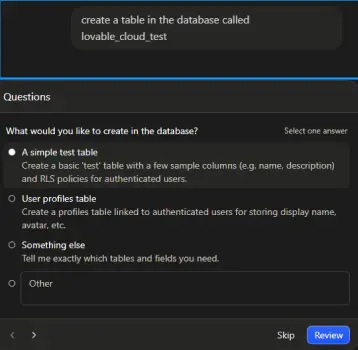 After you answer the questions, it takes some time to create the database. You can find it by navigating to the “Cloud” tab in the navigation menu above.
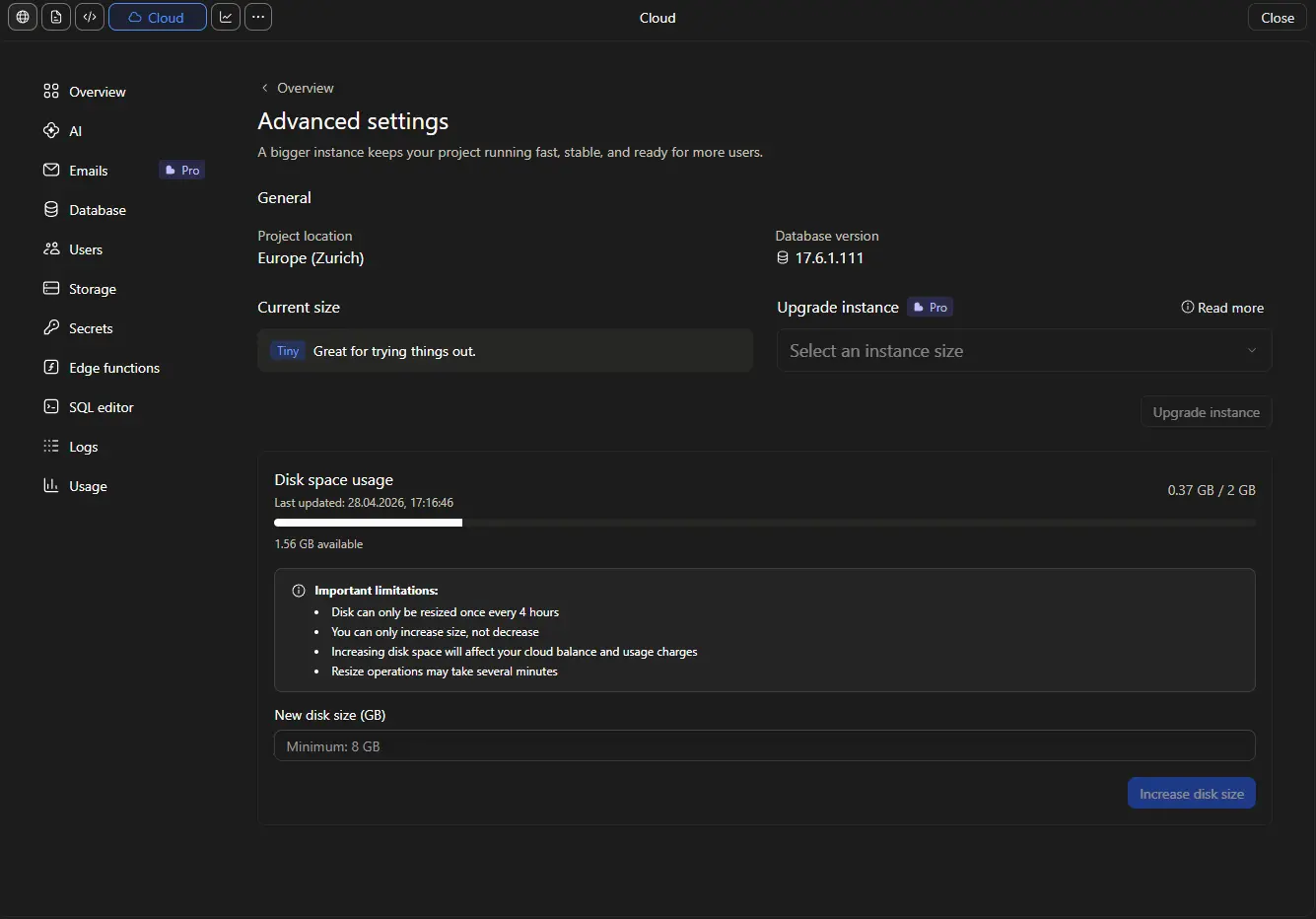
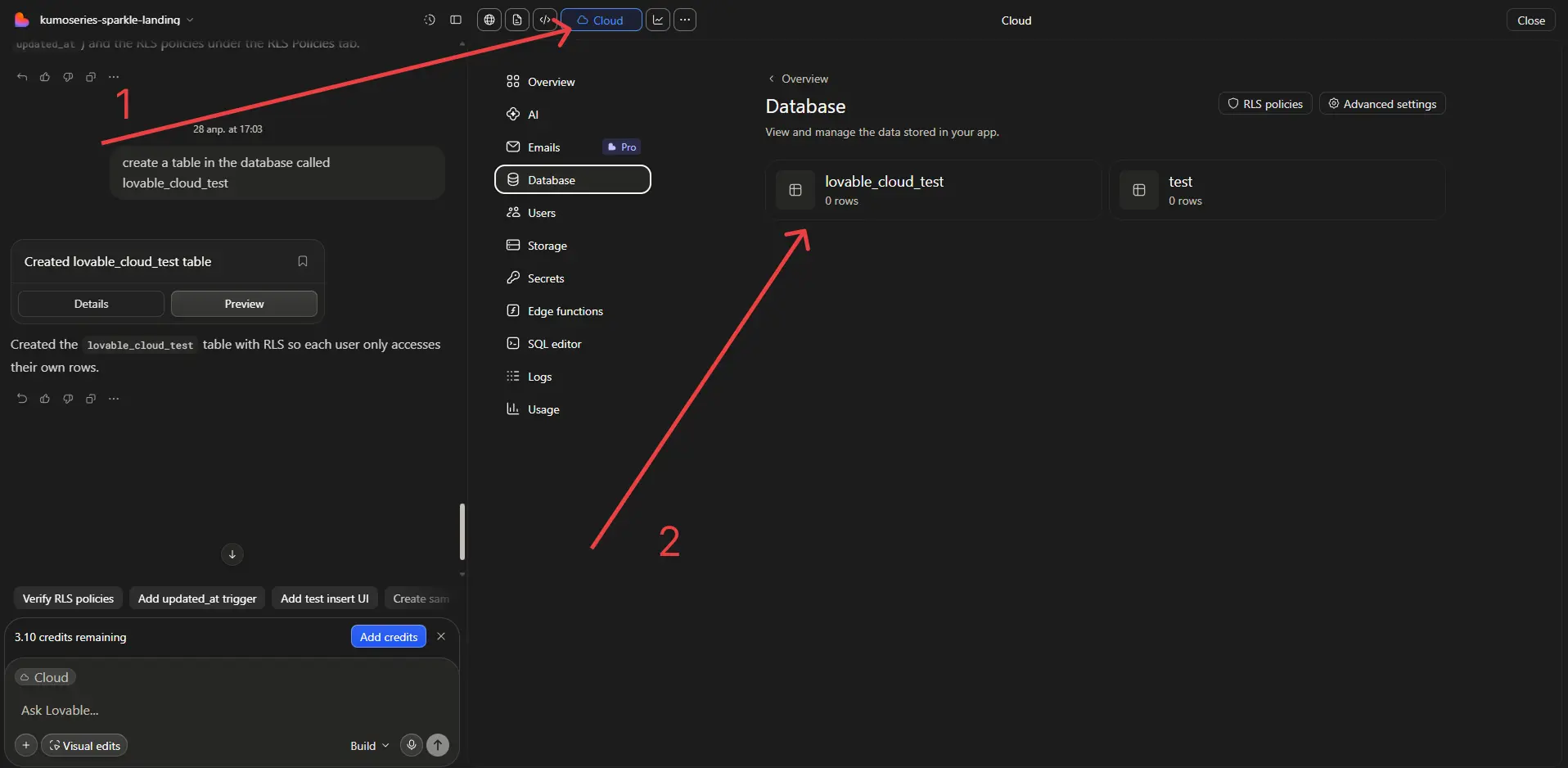 The main setup detail to decide early is region. Lovable Cloud projects can be hosted in the Americas, Europe, or Asia Pacific, and the region cannot be moved after Cloud is enabled for a project. A team serving EU users should pick Europe before adding real data, since latency and data location both depend on that choice.
To check the region used by your project, in the same “Cloud” tab go to the “Overview” tab and scroll all the way down to advanced settings.
When to use Lovable Cloud
- A built-in Lovable database for product records, user profiles, orders, tasks, or form submissions
- Login and signup flows with email, phone, or Google sign-in
- File uploads such as contracts, images, PDFs, or user-generated media
- Edge functions for payments, external API calls, AI workflows, or scheduled backend jobs
- Logs and usage tracking in the same workspace as the app
Lovable Cloud is the best starting point for a new product app if you’re looking for the shortest route from UI to working backend. It is the cleanest way for a lovable database integration when the app’s tables, files, and users belong to the app itself.
Lovable Supabase integration
The Lovable Supabase integration is the strongest external backend option for apps that need a PostgreSQL database plus authentication, storage, real-time updates, and serverless functions. If the project needs a proven app database outside Lovable Cloud, Supabase gives Lovable a full backend to work with.
However, with the introduction of Lovable Cloud, connecting Supabase to a Lovable project has become harder, since Lovable now defaults to its own Cloud backend integration.
How to connect Lovable to Supabase
Lovable’s documentation on Supabase connection is currently outdated. After Lovable introduced Cloud, every project is automatically connected to Lovable Cloud, unless you specifically prompt AI not to do that.
NOTE: If your project is already connected to Lovable Cloud, there is currently no way to disconnect it and switch to Supabase. When prompted, Lovable’s AI will respond with the following.
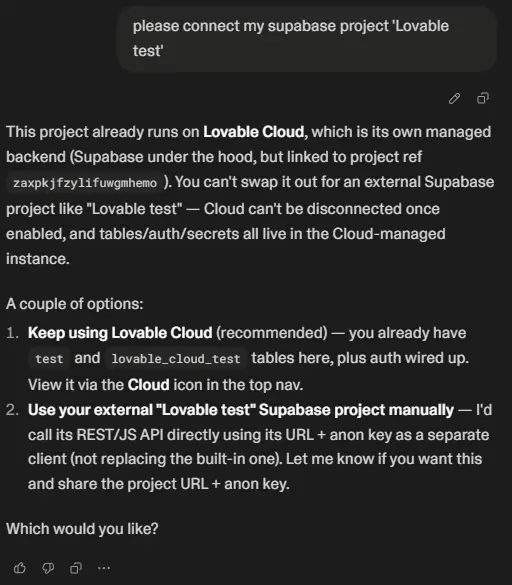 To connect a new Lovable project to Supabase, you need to tell Lovable’s AI before it starts building the project not to connect it to Lovable Cloud. Lovable will then build the project using local state:
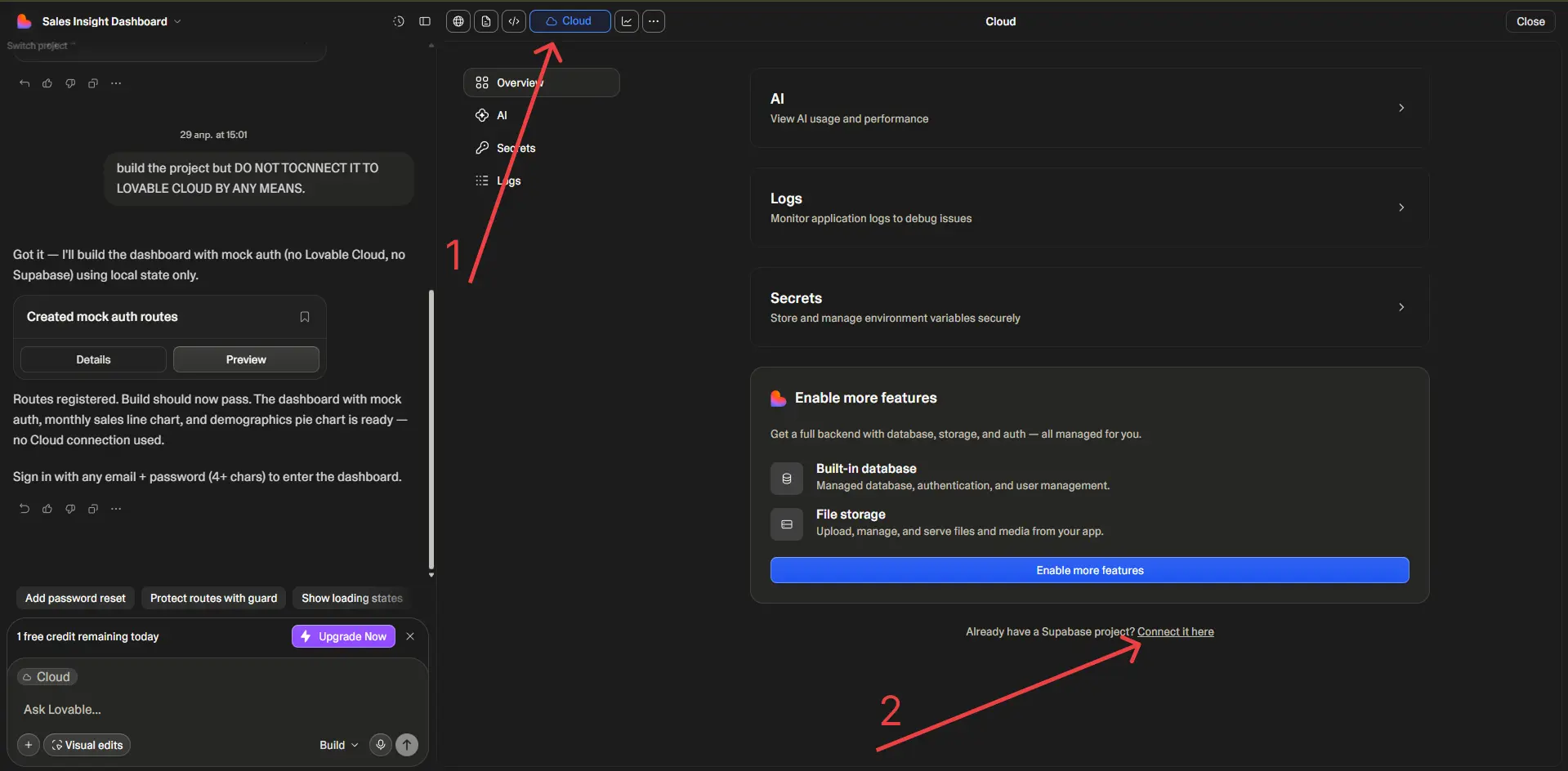
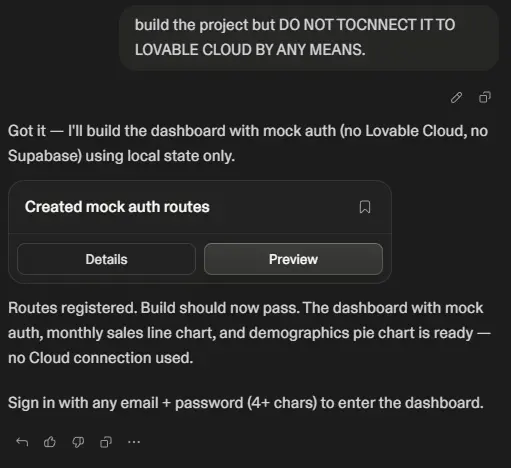 Once the initial version of the project is built, follow these steps:
-
Go to the “Cloud” settings tab and look for “Already have a Supabase project? Connect it here” under Cloud settings.
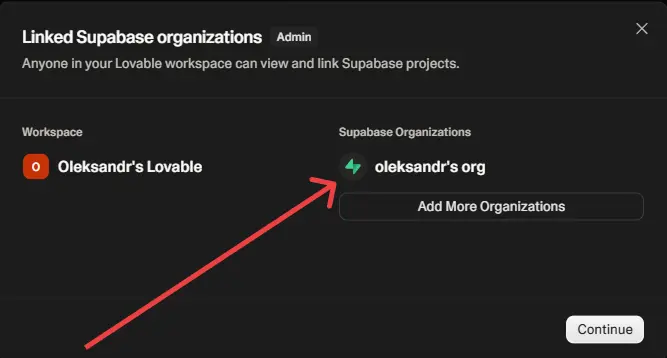
-
Choose the Supabase organization linked to your Lovable account, or connect a new one if you have not done so already. Click Continue.
-
Choose the Supabase project you created for this Lovable project, or create a new one. Click Continue.
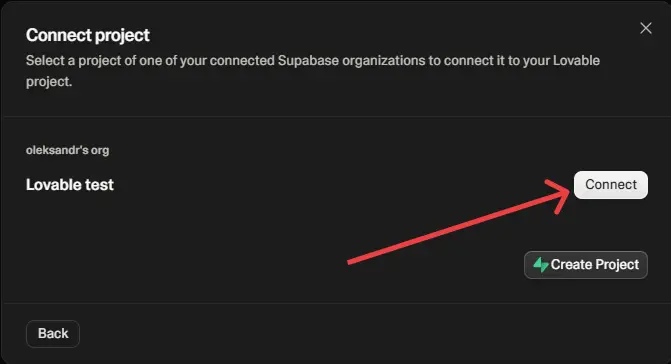
-
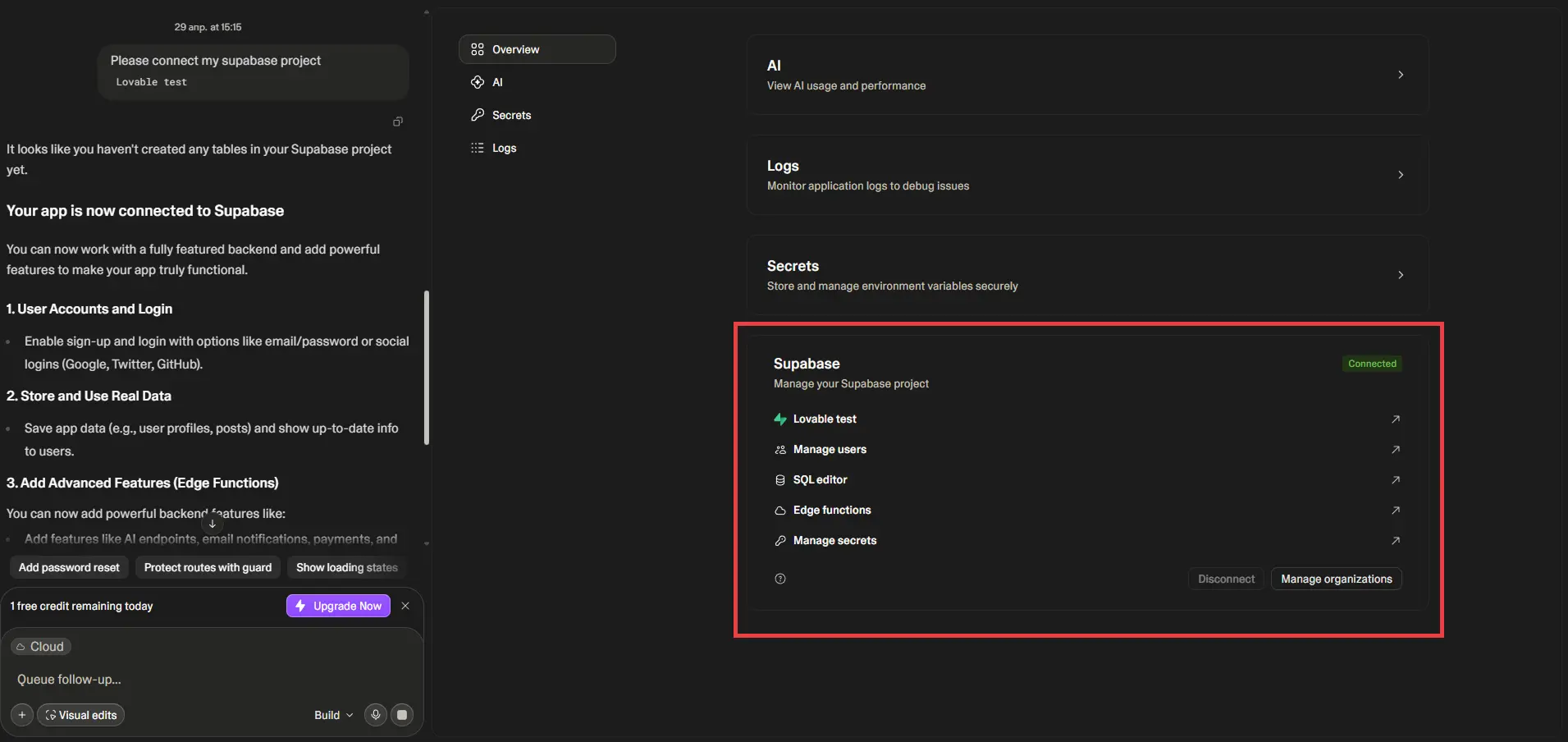
After this, a prompt will automatically appear in the Lovable chat asking it to connect the Supabase project. Supabase project settings will also appear in the ‘Cloud’ tab.
Security deserves special attention once Supabase is connected. Supabase uses row-level security, so each table should have policies that match your product’s access rules.
For example, a project management app should only let users read projects they belong to, while a public directory might allow anyone to read published listings but limit edits to the listing owner.
Lovable can help draft these policies, but you should review them in Supabase before serving it to real users.
When to use Supabase
Supabase is very similar to Lovable Cloud, since Lovable Cloud is built on Supabase foundations.
However, Supabase is not a black box. It gives builders more control and, unlike Lovable Cloud, lets you connect directly to your database. This is useful if you want to use your own database IDE, BI tools for analytics, or managed notification services.
Supabase pricing is also more predictable. Builders are migrating from Lovable Cloud to Supabase because even small databases and modest object storage usage can become expensive on Lovable Cloud. For comparable prices, Supabase offers 100 GB of storage per month.
Overall, choose Supabase when you need more control, direct SQL access, and a mature dashboard outside Lovable. It is the best Lovable database integration for builders who want to keep the momentum with Lovable while retaining full ownership of the backend.
Getting the Supabase backend production-ready
Integrating Supabase doesn’t make the project’s backend ready to go live.
Many Lovable projects get stuck right after the database is connected. Some of the most common backend problems among builders are:
- The tables exist, but auth breaks.
- RLS policies block the wrong users or expose the wrong rows.
- API keys end up in the frontend.
- The preview works but production fails because secrets, CORS, or deployment settings were never cleaned up.
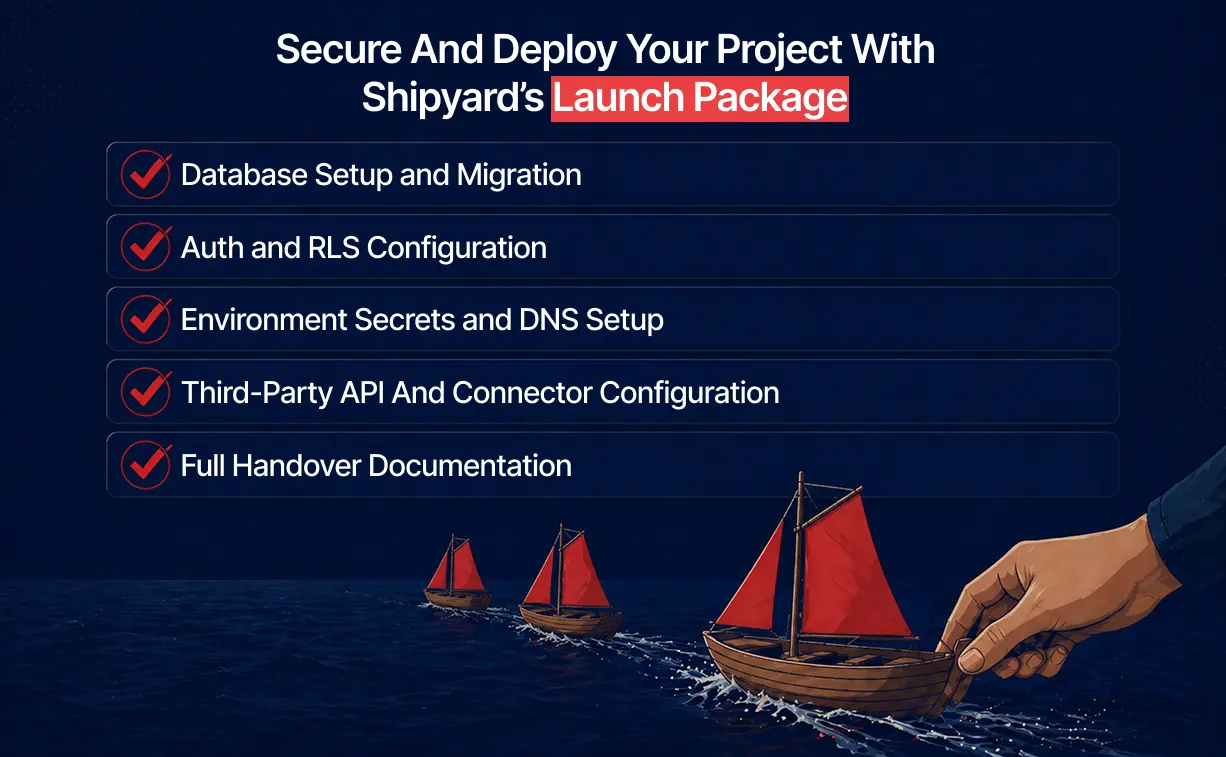
Shipyard helps AI-coded projects move from prototype to fully operational deployment. Our team works with builds that already have the UI in place and need expert engineering support for the backend layer: database setup, Supabase RLS, auth flows, environment secrets, third-party integrations, hosting, and security checks.
If the backend is the main blocker for your Lovable project, Shipyard’s Launch service is designed for exactly that stage. A senior engineer reviews the project, fixes the infrastructure gaps, and helps get it live with clear handover notes.
Lovable BigQuery integration
The lovable BigQuery integration connects Lovable apps to Google BigQuery datasets.
BigQuery is a cloud data warehouse for analytics workloads, so it fits reporting, exploration, and dashboard use cases. Keep day-to-day app records, such as password resets or draft form submissions, in Lovable Cloud or Supabase.
With BigQuery connected, a Lovable app can run SQL, inspect projects and datasets, read schema metadata, query tables and views, and use parameterized queries. A revenue operations team could build an executive dashboard in Lovable that reads weekly revenue, signup counts, churn cohorts, and regional filters from curated BigQuery marts.
How to connect Lovable to BigQuery
The connection uses Google Cloud Workload Identity Federation (WIF). That means Lovable can access BigQuery through short-lived credentials and avoid storing a long-lived JSON key in the app. The service account and IAM permissions still decide what the app can access. If the service account can read only a curated reporting dataset, the Lovable app sees only that dataset.
After the WIF was configured, simply add a BigQuery connection in the Lovable “app connectors” tab, paste the WIF resource name from Google Cloud, and enter the service account in the “Service account email’ tab.
When to use BigQuery
BigQuery is strongest when the app needs analytics data that already lives in Google Cloud. Good examples include:
- A KPI dashboard for leadership
- A customer health viewer for account managers
- A campaign performance explorer for marketing
- A finance report that filters revenue by product line or region
- A data quality screen that reads from warehouse tables
Query cost requires tight control. Builders need to add filters on partitioned tables, avoid broad table scans, use limits during exploration, and set query byte limits where possible. A dashboard that refreshes for every user can run the same query many times, so the SQL should be designed with cost and latency in mind.
Choose BigQuery when Lovable needs to show or manipulate analytics data from Google Cloud. Treat it as a data platform connector for warehouse-backed features, while app-owned records usually belong in Lovable Cloud or Supabase.
Lovable Databricks integration
The lovable databricks integration lets a Lovable app query warehouse data, work with SQL warehouses, list clusters, and build data-driven tools on top of existing Databricks tables and views.
Databricks is a data intelligence and lakehouse platform, so it fits analytics apps, internal tools, and operational dashboards backed by governed enterprise data.
How to connect Lovable to Databricks
One thing to note is that access is controlled through the Databricks connection you configure. The Lovable app inherits the service principal’s access. If the service principal can read sensitive tables, the app can query them too.
To connect Databricks, the workspace usually needs:
- A Databricks workspace URL.
- At least one SQL warehouse.
- A service principal.
- The service principal client ID and client secret.
- Workspace admin or owner access in Lovable.
Once connected, Lovable can use SQL queries to turn Databricks data into app screens, charts, filters, and workflows. A business user can ask for a dashboard that groups revenue by territory, while a data engineer can keep the curated tables and permissions in Databricks.
The main constraint is user-level scoping. The Databricks connector uses the configured connection, so app users share the access granted to that service principal. If different users need different rows, teams should design those rules into the app, the semantic layer, the SQL, or the Databricks permissions behind the connection.
When to use Databricks
A common Databricks Lovable use case is an internal dashboard for a data team or business function. Sales leadership might need live pipeline metrics from curated tables. A support team might need a customer usage viewer that reads product telemetry from a lakehouse. An operations team might need a daily exception queue built from model outputs.
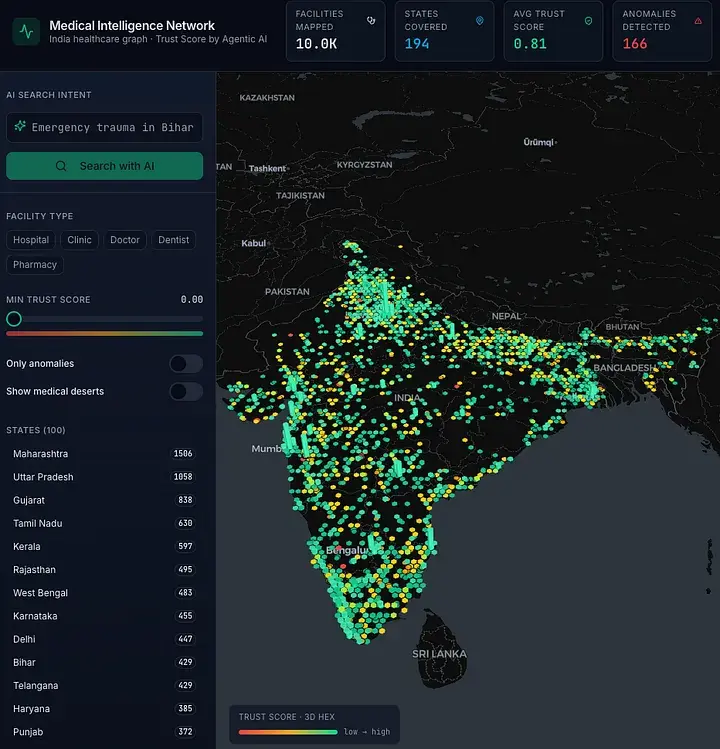 A prototype of medical intelligence system built with Lovable and Databricks
Choose Databricks when the data already lives in a lakehouse and the Lovable app needs to turn that data into a usable interface. It is a strong data platform option for internal tools, with a different role from Supabase or Lovable Cloud.
Lovable Snowflake integration
The lovable snowflake integration connects Lovable apps to Snowflake through OAuth and Lovable’s connector gateway.
Snowflake is a cloud data platform for analytics, data engineering, and AI or machine learning workloads, so it fits apps that need to query warehouses, databases, schemas, and views already governed in Snowflake.
How to connect Lovable to Snowflake
The Snowflake OAuth integration and selected roles decide what the Lovable app can see and do. Besides, high-privilege roles such as account admin or security admin are blocked by the connector validation pattern. A narrower role for the app is the right move, such as one that can read a reporting schema and use a specific warehouse.
The setup usually involves two parts:
- Create a Snowflake OAuth security integration and collect the client ID and client secret.
- Add a Snowflake connection in Lovable with the account URL, client ID, client secret, and role.
After authorization, Lovable can use that connection in apps linked to the workspace connection. The app can query data and support workflows such as dashboard filtering, warehouse-backed search, report viewers, and internal data tools.
When to use Snowflake
With Snowflake connected, Lovable can run SQL, submit statements through Snowflake’s SQL REST API, check statement status, and work with data the configured role can access. A finance team could build a variance dashboard that reads from Snowflake reporting tables. A data operations team could build an approval workflow around refreshed warehouse outputs.
It’s important to remember that Snowflake compute and storage costs are calculated via Snowflake’s pricing. That makes query design important. A Lovable app that runs heavy queries on every page load can consume warehouse credits quickly. For production apps, use curated tables, clear filters, and role-scoped access for predictable queries.
Choose Snowflake when your organization already uses Snowflake as the analytics layer and wants Lovable to provide the interface.
Lovable AWS S3 integration
AWS S3 is worth mentioning because many Lovable data apps rely on file-based data, even though S3 is object storage rather than a database per se.
S3 stores files such as CSV, JSON, Parquet, images, PDFs, exports, and pipeline outputs. In Lovable, that makes S3 useful for file explorers, upload flows, report portals, and dashboards that read exported datasets.
How to connect Lovable to S3
The connection is based on an AWS access key tied to a bucket and region. For read-only use, the IAM policy should allow listing the bucket and reading objects. For uploads, it also needs write access. Browser-based uploads or downloads that use signed URLs need a CORS policy that allows the Lovable app’s origin.
S3 should be paired with a database when the app needs relational records, search filters, permissions, or user-specific states. Store the file in S3, then store metadata such as owner, status, upload date, and file URL in Lovable Cloud or Supabase. That pairing keeps file storage cheap and flexible while the app still has a real database for workflow state.
When to use S3
S3 fits cases where the data arrives as files. For example, a logistics team might drop daily CSV exports into a bucket, then use a Lovable app to browse freshness, download files, and display selected rows.
Choose S3 when the Lovable app manipulates file data or uploads. It belongs near the lovable database conversation because file-backed workflows often sit beside the main application database.
Need help shipping your Lovable app?
Picking the right Lovable database is one decision. Shipping the app safely is the next one.
If you built the frontend in Lovable and now need help with the database, auth, RLS, API keys, third-party integrations, or deployment, Shipyard by Vodworks can take it from here. The service is made for vibe-coded projects that are past the prototype stage and need real engineering support to go live.
Shipyard offers a free discovery session where a senior engineer reviews what you’ve built, identifies what is blocking launch, and gives you a clear roadmap.
For broken builds, the Rescue package helps fix urgent issues. For production launches, our Launch offering handles the full backend and deployment pass. For safety concerns, Guard package audits security, RLS, secrets, and payment flows. The Crew package gives you ongoing engineering support after launch.
If your Lovable project has the vibe but the backend is still messy, book a free Shipyard discovery session and get a clear path to production.

About the Author
Hussain Ali

With over 16 years of expertise, Hussain is a distinguished professional in full stack, mobile, game, and blockchain development. As a solution architect, he excels in pre-sales, displaying a strong inclination towards innovative strategies. Hussain has significantly impacted the gaming industry, contributing to both 2D and 3D games. Beyond coding, he actively shapes entire game narratives, including mechanics and story development. Dedicated to solving intricate challenges, he crafts meticulous technical proposals for Request for Proposals (RFPs), ensuring seamless integration of technology and business objectives.


Accelerate Your Projects With Our On-Demand Developers
Let's TalkTalent Shortage Holding You Back? Scale Fast With Us
Frequently Asked Questions
How do you handle different time zones?

With a team of 150+ expert developers situated across 5 Global Development Centers and 10+ countries, we seamlessly navigate diverse timezones. This gives us the flexibility to support clients efficiently, aligning with their unique schedules and preferred work styles. No matter the timezone, we ensure that our services meet the specific needs and expectations of the project, fostering a collaborative and responsive partnership.
What levels of support do you offer?
We provide comprehensive technical assistance for applications, providing Level 2 and Level 3 support. Within our services, we continuously oversee your applications 24/7, establishing alerts and triggers at vulnerable points to promptly resolve emerging issues. Our team of experts assumes responsibility for alarm management, overseas fundamental technical tasks such as server management, and takes an active role in application development to address security fixes within specified SLAs to ensure support for your operations. In addition, we provide flexible warranty periods on the completion of your project, ensuring ongoing support and satisfaction with our delivered solutions.
Who owns the IP of my application code/will I own the source code?
As our client, you retain full ownership of the source code, ensuring that you have the autonomy and control over your intellectual property throughout and beyond the development process.
How do you manage and accommodate change requests in software development?
We seamlessly handle and accommodate change requests in our software development process through our adoption of the Agile methodology. We use flexible approaches that best align with each unique project and the client's working style. With a commitment to adaptability, our dedicated team is structured to be highly flexible, ensuring that change requests are efficiently managed, integrated, and implemented without compromising the quality of deliverables.
What is the estimated timeline for creating a Minimum Viable Product (MVP)?
The timeline for creating a Minimum Viable Product (MVP) can vary significantly depending on the complexity of the product and the specific requirements of the project. In total, the timeline for creating an MVP can range from around 3 to 9 months, including such stages as Planning, Market Research, Design, Development, Testing, Feedback and Launch.
Do you provide Proof of Concepts (PoCs) during software development?
Yes, we offer Proof of Concepts (PoCs) as part of our software development services. With a proven track record of assisting over 70 companies, our team has successfully built PoCs that have secured initial funding of $10Mn+. Our team helps business owners and units validate their idea, rapidly building a solution you can show in hand. From visual to functional prototypes, we help explore new opportunities with confidence.
Are we able to vet the developers before we take them on-board?
When augmenting your team with our developers, you have the ability to meticulously vet candidates before onboarding. We ask clients to provide us with a required developer’s profile with needed skills and tech knowledge to guarantee our staff possess the expertise needed to contribute effectively to your software development projects. You have the flexibility to conduct interviews, and assess both developers’ soft skills and hard skills, ensuring a seamless alignment with your project requirements.
Is on-demand developer availability among your offerings in software development?
We provide you with on-demand engineers whether you need additional resources for ongoing projects or specific expertise, without the overhead or complication of traditional hiring processes within our staff augmentation service.
Do you collaborate with startups for software development projects?
Yes, our expert team collaborates closely with startups, helping them navigate the technical landscape, build scalable and market-ready software, and bring their vision to life.
Our startup software development services & solutions:
- MVP & Rapid POC's
- Investment & Incubation
- Mobile & Web App Development
- Team Augmentation
- Project Rescue
Subscribe to our blog
Related Posts
Get in Touch with us
Thank You!
Thank you for contacting us, we will get back to you as soon as possible.
Our Next Steps
- Our team reaches out to you within one business day
- We begin with an initial conversation to understand your needs
- Our analysts and developers evaluate the scope and propose a path forward
- We initiate the project, working towards successful software delivery