


Replit Database Integration Guide: Native PostgreSQL, Supabase, and Other Options

August 3, 2026 - 6 min read

Author
Replit makes it easy to turn an idea into a working prototype. Database setup becomes more involved once the app needs persistent user data, authentication, file storage, or a separate production environment.
Replit provides a managed PostgreSQL database by default. Apps can also connect to external services such as Supabase, Firebase, MongoDB Atlas, and Neon. Each option has different requirements for credentials, client libraries, access controls, deployment, and ongoing database management.
By the end of this guide, you’ll understand how Replit Database works, how to connect Supabase and other third-party databases, and which option best fits your app’s data model and production requirements.
Replit Database integration: the default option
Replit Database is the most direct database option for apps built and hosted on Replit. Every Replit App includes a managed PostgreSQL development database. Replit Agent can connect the database to the application, create its schema, and update the code required to store and retrieve data. The Database tool in the Project Editor provides access to tables, rows, SQL queries, connection details, and storage usage.
This option works well for applications that need structured relational data. An inventory system might use tables for products, suppliers, stock movements, and warehouse locations. A customer support portal could store accounts, conversations, ticket assignments, priorities, and status histories. The builder can describe these requirements to Agent, which then handles the database integration.
Current Replit development databases use PostgreSQL 16 on Replit’s Helium infrastructure. When the app is published, Replit creates a separate production database. This keeps test data and ongoing development work separate from live user records. Agent can modify the development schema, and Replit applies those schema changes during publishing. Agent cannot edit the production database directly.
Replit creates and manages the database within the project, including its connection credentials. The application accesses the database through the DATABASE_URL environment variable. Database configuration sits in the Project Editor alongside Agent, the application code, and the publishing tools.
Replit Database handles structured relational data. Replit Auth manages user authentication, while Replit App Storage stores files such as images, videos, and documents.
How to connect Replit Database
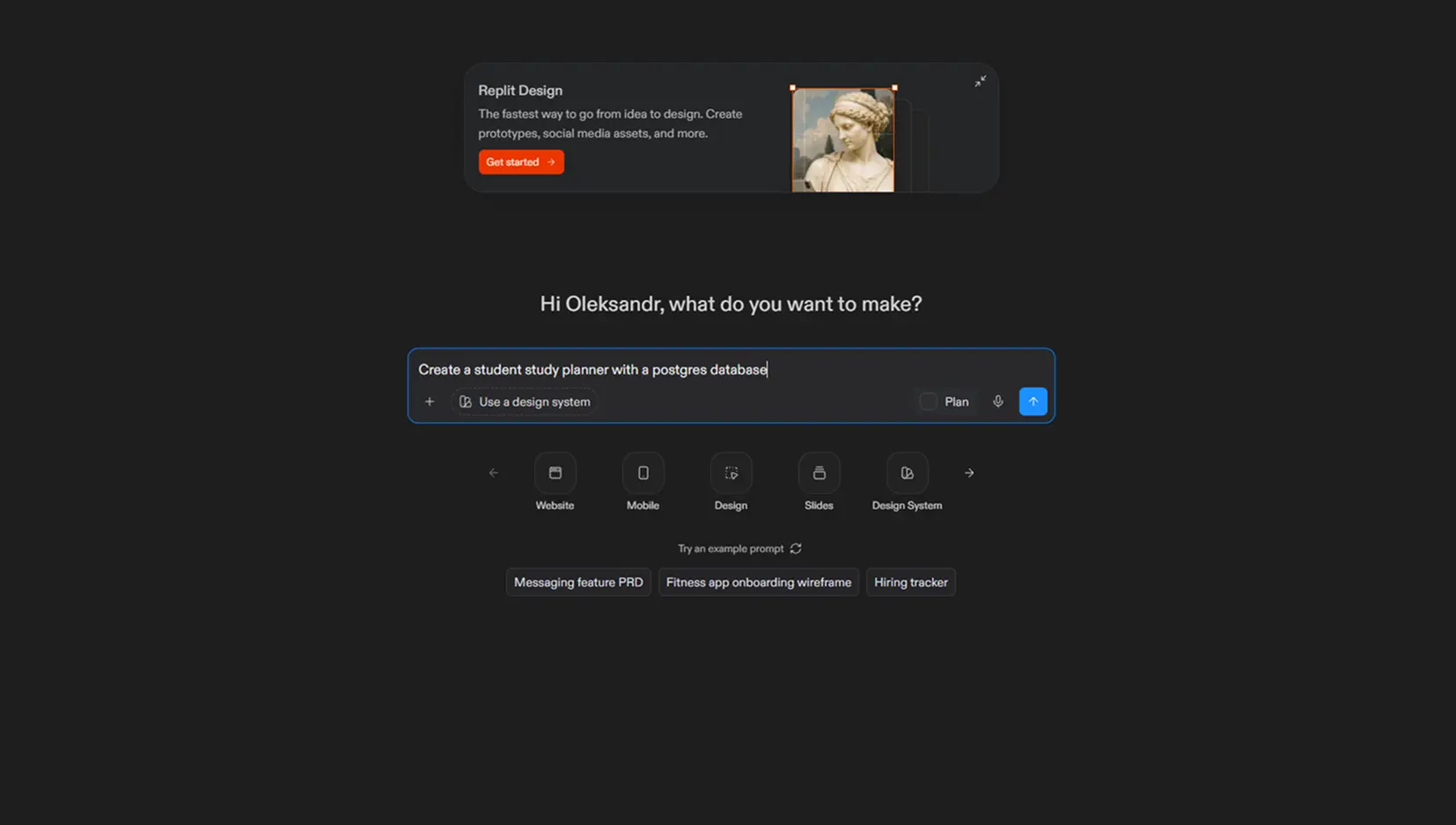
When starting a new project, tell Replit Agent that the app needs a database and describe the data it should store. Agent will connect the built-in development database, create the required schema, and update the application code. It can also add sample data when requested.
 After Agent finishes building the project, open the Tools (1) pane and select Database (2) under Replit Cloud.
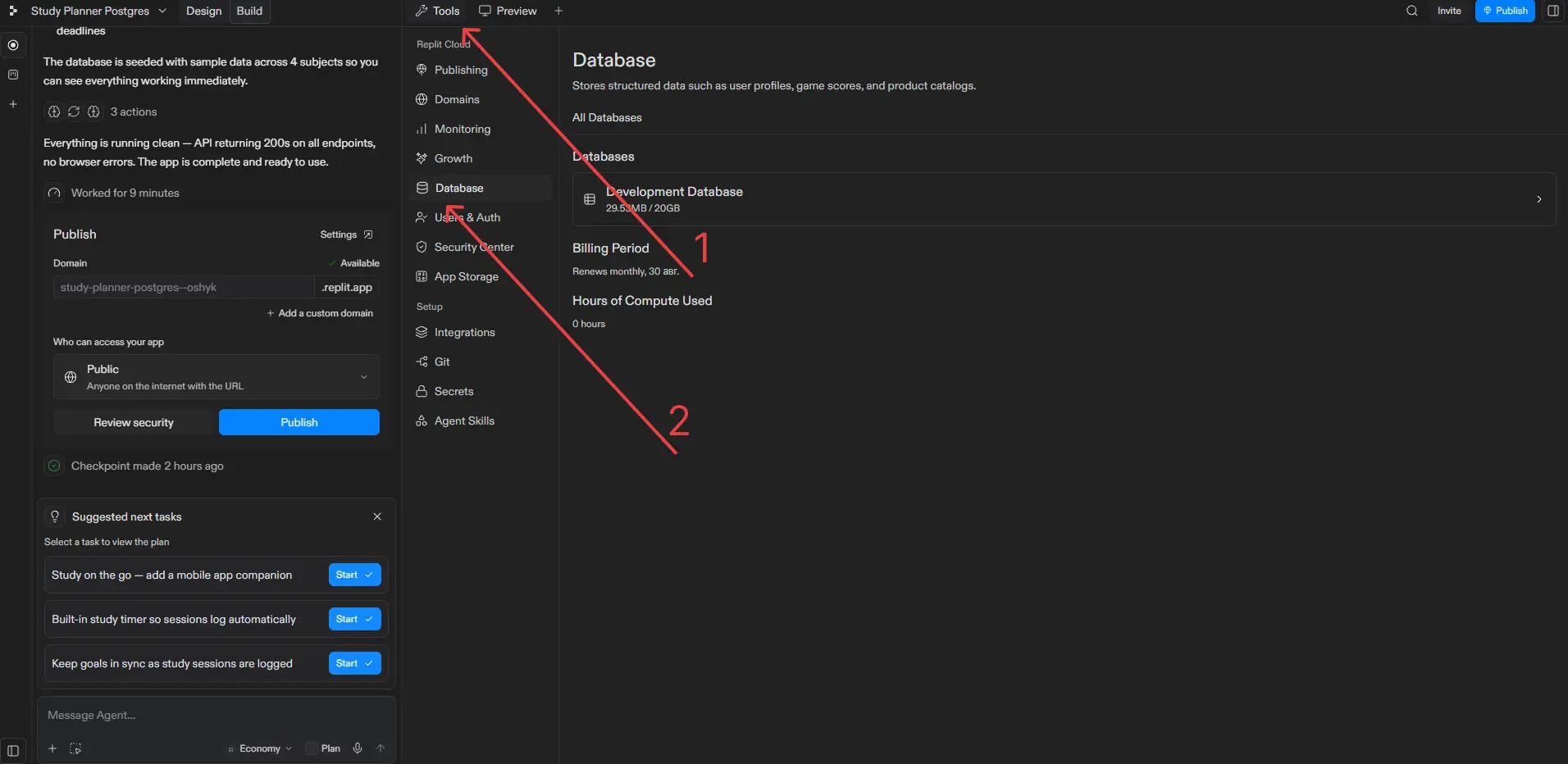 The Database page lists the databases connected to the app. Select Development Database to open it.
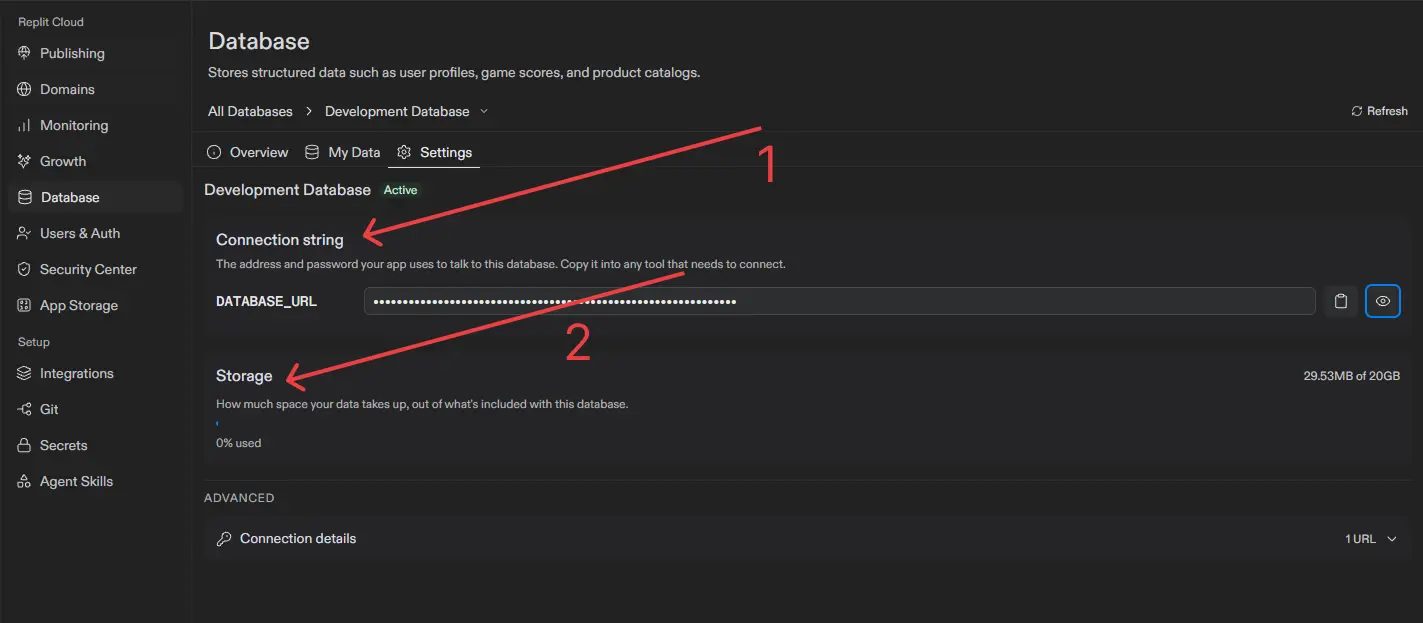 Open Settings to view the database connection details (1) and storage usage (2). Replit provides the connection through the DATABASE_URL environment variable. The current development database is restricted to its assigned Replit App, so external database tools cannot connect to it. After publishing, you can connect PostgreSQL-compatible tools to the production database using its production connection string.
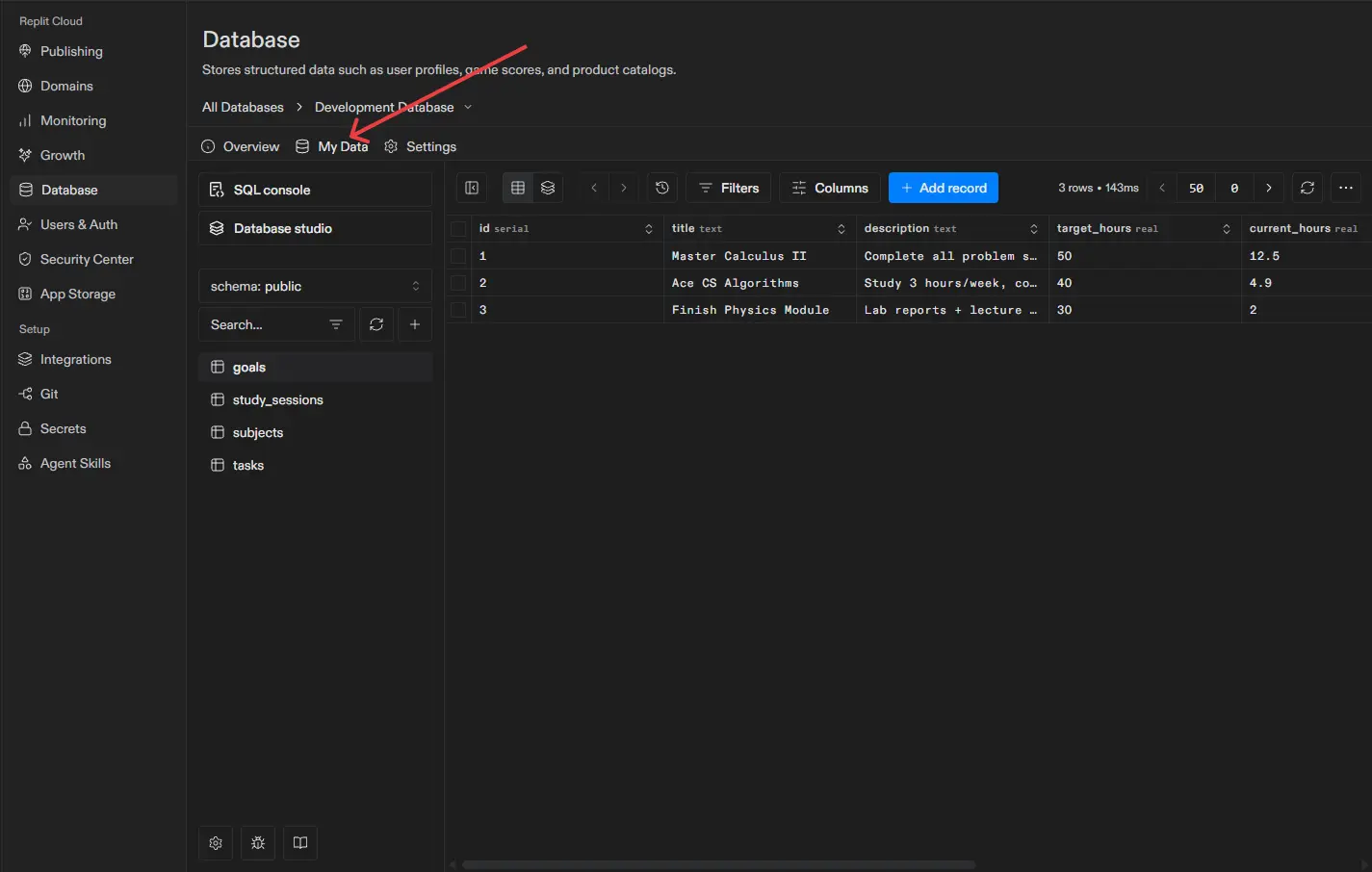 Open the My Data tab to see the database tables and browse, filter, or edit their records. The SQL console allows you to query the database directly with PostgreSQL commands.
How to manually add a database to the existing Replit project
If you imported a project or just created a blank project in Replit, you can create and connect the database to it manually.
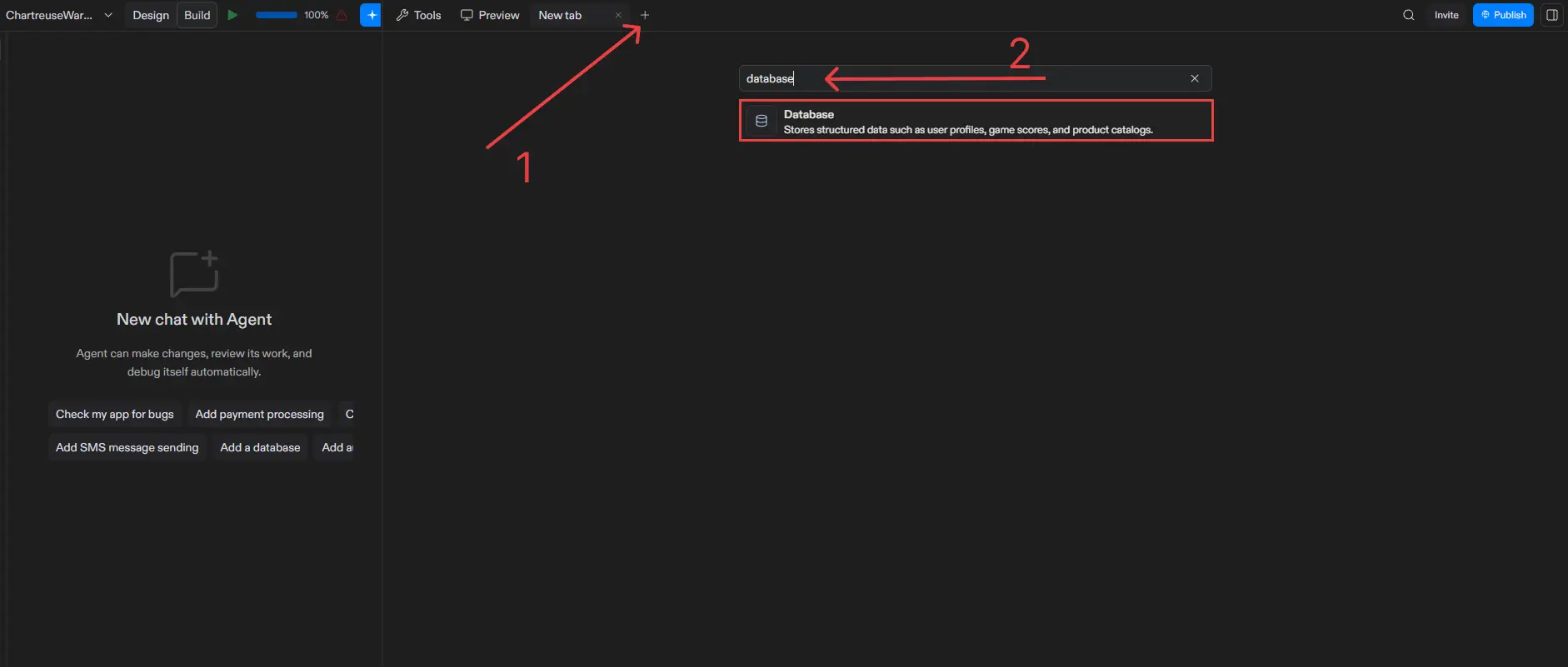
The process resembles the previous steps. You have to open a new tab and in the search bar type in Database.Choose the Database option and Replit will either suggest you to create a new Database for the project or use an existing production database that you can further populate with required tables.
Storage, scaling, and usage
Each Replit App includes a development database with 20 GB of storage. Production databases use usage-based billing for storage and compute.
Production compute enters an idle state after five minutes without a query. Compute billing pauses while the database is idle and resumes when another query arrives. Storage charges continue while the data remains stored.
Database recovery
A development database can be restored to an Agent checkpoint. When rolling back, select Database under the additional rollback options to restore the data stored at that checkpoint.
Production databases support point-in-time recovery. Replit currently retains seven days of production history on Core plans and up to 28 days on Pro and Teams plans.
Application code and production data must be restored separately. If a release changes both the code and database schema, restore each one to the corresponding point in time.
How to connect Replit to Supabase
Replit includes a managed PostgreSQL database, and apps can also connect to Supabase. Supabase may suit applications that already use a Supabase project or require Supabase Auth, Storage, Realtime subscriptions, or Row Level Security (RLS).
A Replit app’s server can connect directly to Supabase PostgreSQL through a connection string and an ORM such as Drizzle. The application can also use the Supabase JavaScript client to access Auth, Storage, Realtime, and the Data API. Some projects use both connection methods.
Store the PostgreSQL connection string in Replit Secrets and access it through a server-side environment variable. Applications using the Supabase client also need the project URL and publishable key. Tables accessed directly from the browser should have RLS enabled with policies that define which records each user can read or modify.
To configure the integration, copy the required values from Supabase, add them as environment variables in Replit, and ask Replit Agent to update the application. Courtney from Opichi AI demonstrates the process step by step in this TikTok guide:
Other Replit Database Options
Replit can connect to most external databases that provide a connection string, SDK, or HTTP API. Store the credentials in Replit Secrets, then ask the Agent to install the appropriate driver and update the application code. Each provider uses its own management dashboard, leaving backups, billing, access controls, and development environments under the builder’s control.
Firebase Cloud Firestore
A Replit app connects to Firebase through the Firebase JavaScript SDK, using the configuration object generated when the web app is registered. Server-side operations use the Firebase Admin SDK and credentials stored in Replit Secrets.
Firestore suits mobile applications, real-time interfaces, messaging, and products that use Firebase Authentication or Cloud Storage. Its document model supports flexible records without requiring a relational schema at the start. Applications that depend on SQL joins, complex relationships, relational reporting, or transactions across many connected records may require more application logic. Firebase documents the web connection process here.
MongoDB Atlas
MongoDB Atlas provides a connection URI containing the cluster address and database credentials. Store this value as an environment variable such as MONGODB_URI in Replit Secrets. Configure Atlas Network Access, then connect through the official MongoDB driver or Mongoose.
MongoDB works well for content platforms, product catalogs, user profiles, event data, and applications where records may contain different fields. Its document model allows the data structure to change as the application develops.
Business records such as invoices, payments, and inventory often rely on strict relationships and constraints, which PostgreSQL handles more naturally. Complex joins and relational reports in MongoDB may require aggregation pipelines or additional application logic. See the MongoDB Atlas connection guide.
Neon
Neon is an independently managed serverless PostgreSQL service. Store the Neon connection string in Replit Secrets and connect through Drizzle, Prisma, node-postgres, or another PostgreSQL-compatible library. Neon provides pooled connections for application traffic, while some schema migration tools require a direct connection.
Neon suits teams that already have a Neon project, want to manage the database separately from Replit, or need PostgreSQL branching and serverless scaling. Existing PostgreSQL schemas and queries usually require few changes.
Replit does not manage its native development and production database workflow for an external Neon project. The team must manage branches, recovery, billing, and usage through Neon.
Neon explains its pooled and direct connections here.
Need help shipping your Replit app?
Choosing between Replit Database, Supabase, and another external database is one decision. Getting the entire application ready for production is the next one.
If you built your app with Replit and need help with its database, authentication, schema migrations, App Storage, secrets, third-party integrations, or publishing setup, Shipyard by Vodworks can take it from here. The service is designed for vibe-coded or heavily AI-assisted projects that have moved beyond the prototype stage and need experienced engineering support to launch reliably.
Shipyard offers a free discovery session in which a senior engineer reviews your Replit app, identifies technical and security issues that could block its release, and provides a clear roadmap to production.
The Shipyard team can cover the backend, database, integrations, and deployment process or address urgent technical problems that might arise in production. The Guard package audits authentication, database permissions, Supabase RLS policies, secrets, API keys, and payment flows.
If your Replit app works in preview but its backend or production setup still needs attention, book a free Shipyard discovery session and get a clear path to launch.

About the Author
Hussain Ali

With over 16 years of expertise, Hussain is a distinguished professional in full stack, mobile, game, and blockchain development. As a solution architect, he excels in pre-sales, displaying a strong inclination towards innovative strategies. Hussain has significantly impacted the gaming industry, contributing to both 2D and 3D games. Beyond coding, he actively shapes entire game narratives, including mechanics and story development. Dedicated to solving intricate challenges, he crafts meticulous technical proposals for Request for Proposals (RFPs), ensuring seamless integration of technology and business objectives.


Accelerate Your Projects With Our On-Demand Developers
Let's TalkTalent Shortage Holding You Back? Scale Fast With Us
Frequently Asked Questions
How do you handle different time zones?

With a team of 150+ expert developers situated across 5 Global Development Centers and 10+ countries, we seamlessly navigate diverse timezones. This gives us the flexibility to support clients efficiently, aligning with their unique schedules and preferred work styles. No matter the timezone, we ensure that our services meet the specific needs and expectations of the project, fostering a collaborative and responsive partnership.
What levels of support do you offer?
We provide comprehensive technical assistance for applications, providing Level 2 and Level 3 support. Within our services, we continuously oversee your applications 24/7, establishing alerts and triggers at vulnerable points to promptly resolve emerging issues. Our team of experts assumes responsibility for alarm management, overseas fundamental technical tasks such as server management, and takes an active role in application development to address security fixes within specified SLAs to ensure support for your operations. In addition, we provide flexible warranty periods on the completion of your project, ensuring ongoing support and satisfaction with our delivered solutions.
Who owns the IP of my application code/will I own the source code?
As our client, you retain full ownership of the source code, ensuring that you have the autonomy and control over your intellectual property throughout and beyond the development process.
How do you manage and accommodate change requests in software development?
We seamlessly handle and accommodate change requests in our software development process through our adoption of the Agile methodology. We use flexible approaches that best align with each unique project and the client's working style. With a commitment to adaptability, our dedicated team is structured to be highly flexible, ensuring that change requests are efficiently managed, integrated, and implemented without compromising the quality of deliverables.
What is the estimated timeline for creating a Minimum Viable Product (MVP)?
The timeline for creating a Minimum Viable Product (MVP) can vary significantly depending on the complexity of the product and the specific requirements of the project. In total, the timeline for creating an MVP can range from around 3 to 9 months, including such stages as Planning, Market Research, Design, Development, Testing, Feedback and Launch.
Do you provide Proof of Concepts (PoCs) during software development?
Yes, we offer Proof of Concepts (PoCs) as part of our software development services. With a proven track record of assisting over 70 companies, our team has successfully built PoCs that have secured initial funding of $10Mn+. Our team helps business owners and units validate their idea, rapidly building a solution you can show in hand. From visual to functional prototypes, we help explore new opportunities with confidence.
Are we able to vet the developers before we take them on-board?
When augmenting your team with our developers, you have the ability to meticulously vet candidates before onboarding. We ask clients to provide us with a required developer’s profile with needed skills and tech knowledge to guarantee our staff possess the expertise needed to contribute effectively to your software development projects. You have the flexibility to conduct interviews, and assess both developers’ soft skills and hard skills, ensuring a seamless alignment with your project requirements.
Is on-demand developer availability among your offerings in software development?
We provide you with on-demand engineers whether you need additional resources for ongoing projects or specific expertise, without the overhead or complication of traditional hiring processes within our staff augmentation service.
Do you collaborate with startups for software development projects?
Yes, our expert team collaborates closely with startups, helping them navigate the technical landscape, build scalable and market-ready software, and bring their vision to life.
Our startup software development services & solutions:
- MVP & Rapid POC's
- Investment & Incubation
- Mobile & Web App Development
- Team Augmentation
- Project Rescue
Subscribe to our blog
Related Posts
Get in Touch with us
Thank You!
Thank you for contacting us, we will get back to you as soon as possible.
Our Next Steps
- Our team reaches out to you within one business day
- We begin with an initial conversation to understand your needs
- Our analysts and developers evaluate the scope and propose a path forward
- We initiate the project, working towards successful software delivery